Dentally Login: How to Sign In, Fix Login Problems and Our Dentally Review
Quick answer: practice staff log in to Dentally at app.dentally.co using the email address and password set up by their practice.
If you’re a dental nurse, receptionist, hygienist or locum, Dentally is likely to be part of your working day. This guide shows you how to sign in, how to fix the most common login problems, and what Dentally is actually like to use.
How to log in to Dentally
- Go to app.dentally.co in your web browser. Dentally is cloud-based, so there’s nothing to install.
- Enter the email address your practice registered for you.
- Enter your password.
- If two-factor authentication (2FA) is switched on, enter the one-time code from your authenticator app or text message.
- If your practice uses single sign-on (SSO), choose the SSO option and sign in with your work account instead.
Patients don’t use this page. They sign in to Dentally Portal using their mobile number or email, a passcode sent to their phone, and their password.
Dentally login problems and how to fix them
| Problem | What to do |
|---|---|
| Forgotten password | Click “Forgotten your password?” under the login fields, enter your registered email and follow the reset email. Check junk and spam if it doesn’t arrive. |
| Account locked | Click “Didn’t receive unlock instructions?” under the login box to resend the unlock email. |
| Password rejected | New passwords need at least 10 characters, with an uppercase letter, a lowercase letter, a number and a special character. |
| 2FA code needed during a reset | With 2FA on, a password reset also asks for a code from your authenticator app, so keep your phone to hand. |
| New phone, lost 2FA access | Ask your practice manager or Dentally support to help you regain access. |
| SSO login not working | Make sure you’re choosing the SSO option and signing in with the work account your practice has set up. |
| Page won’t load | Try another browser, clear your cache, and check Dentally’s status page for outages. |
If none of these work, contact your practice manager first. They can check your user account. Dentally’s support team can help with anything else.
What is Dentally?
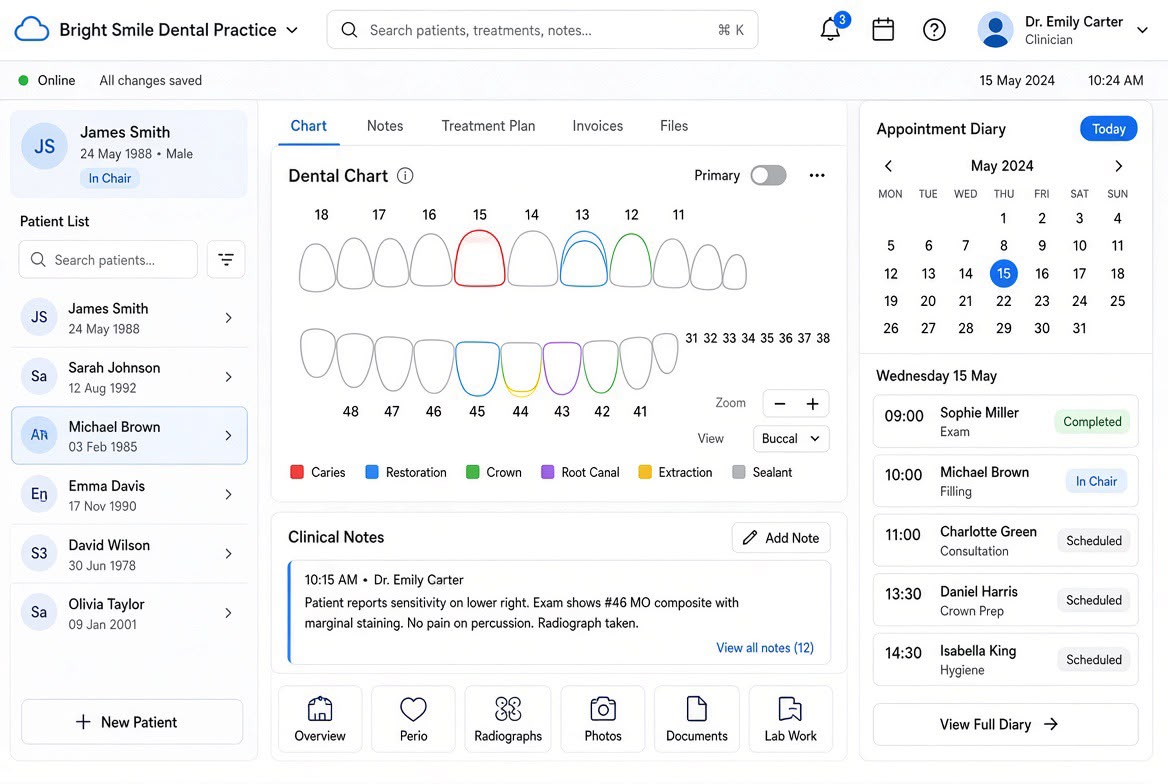
Dentally is cloud-based dental practice management software, founded in 2014 and now part of Henry Schein One. It runs in a web browser, with Google Chrome recommended, so staff can use it on any computer without installing software or maintaining a practice server.
Practices use it for appointments, clinical charting, patient records, NHS claims, recalls and reminders, payments and reporting. It works for single-surgery practices through to multi-site groups, which share one patient database. It is used across the UK, Ireland, Australia, New Zealand and Canada.
Dentally review: features, pros and cons
Dentally gets mixed but useful feedback. On Capterra UK it is rated 3.6 out of 5 from 18 reviews (October 2026). Users praise its automation and modern feel, while the main complaints are about support, data migration and a recent interface update.
Key features
- Cloud access: log in from any computer with a browser, including from home for admin tasks.
- Appointment book: online booking, short-notice appointment filling and automated reminders.
- Clinical charting and notes: including AI-assisted note-taking and imaging tools.
- NHS and private: full NHS claiming alongside private and plan patients.
- Patient Portal and forms: patients complete medical histories and consent forms online or on an iPad at reception or chairside.
- Automated recalls and messaging: reduces time spent chasing patients.
- Reporting: real-time figures for practice managers and owners.
Pros
- Nothing to install or back up, and updates arrive automatically.
- Clean, modern interface that new staff tend to pick up quickly.
- Strong automation for reminders, recalls and follow-up tasks.
- Works well for multi-site groups with one shared patient database.
- Two-factor authentication and single sign-on improve security.
Cons
- Some users report slow or template-style support, especially after signing up.
- Moving data from older systems such as R4 can need significant tidying afterwards.
- Some long-term users found a recent interface update slower and harder to navigate.
- It depends on a reliable internet connection.
Our verdict
For staff, Dentally is one of the easier systems to learn, and its cloud access is a real plus. Practices thinking of switching should plan migration carefully and agree training and support terms in writing before signing.
Tips for locums and new starters using Dentally
- Ask for your login before your first shift. The practice has to create your user account, so request it a day or two ahead.
- Set up 2FA on your own phone and keep it with you. You’ll need it for every login, and for any password reset.
- Use Google Chrome for the smoothest experience.
- Never share logins. Each user’s actions are recorded against their account, which matters for clinical records and compliance.
- Learn the appointment book and charting first. For dental nurses, these are the screens you’ll use most.
- List Dentally on your CV. Practices value staff who already know their system, and it can help you settle into locum shifts faster.
Dentally login FAQs
What is the Dentally login page?
Practice staff log in at app.dentally.co. Patients use the separate Dentally Portal link provided by their practice.
I’ve forgotten my Dentally password. What do I do?
Click “Forgotten your password?” on the login page, enter your registered email and follow the reset email. If it doesn’t arrive, check junk and spam, then contact your practice manager.
Why is my Dentally account locked?
Usually after several failed login attempts. Click “Didn’t receive unlock instructions?” under the login box to get an unlock email.
Can I log in to Dentally from home?
Yes. Dentally is cloud-based, so it works from any computer with a browser, if your practice allows remote access.
Is Dentally free?
No. Practices pay a subscription for each user. Staff don’t pay to use it.
Find dental roles with DRN
Already confident on Dentally, R4, SOE or another practice system? That experience makes you a stronger candidate. Dental Recruit Network places GDC-registered dental nurses, hygienists, therapists and associates into locum and permanent roles with practices across the UK.